
Cash Flow Ledger (DDS)
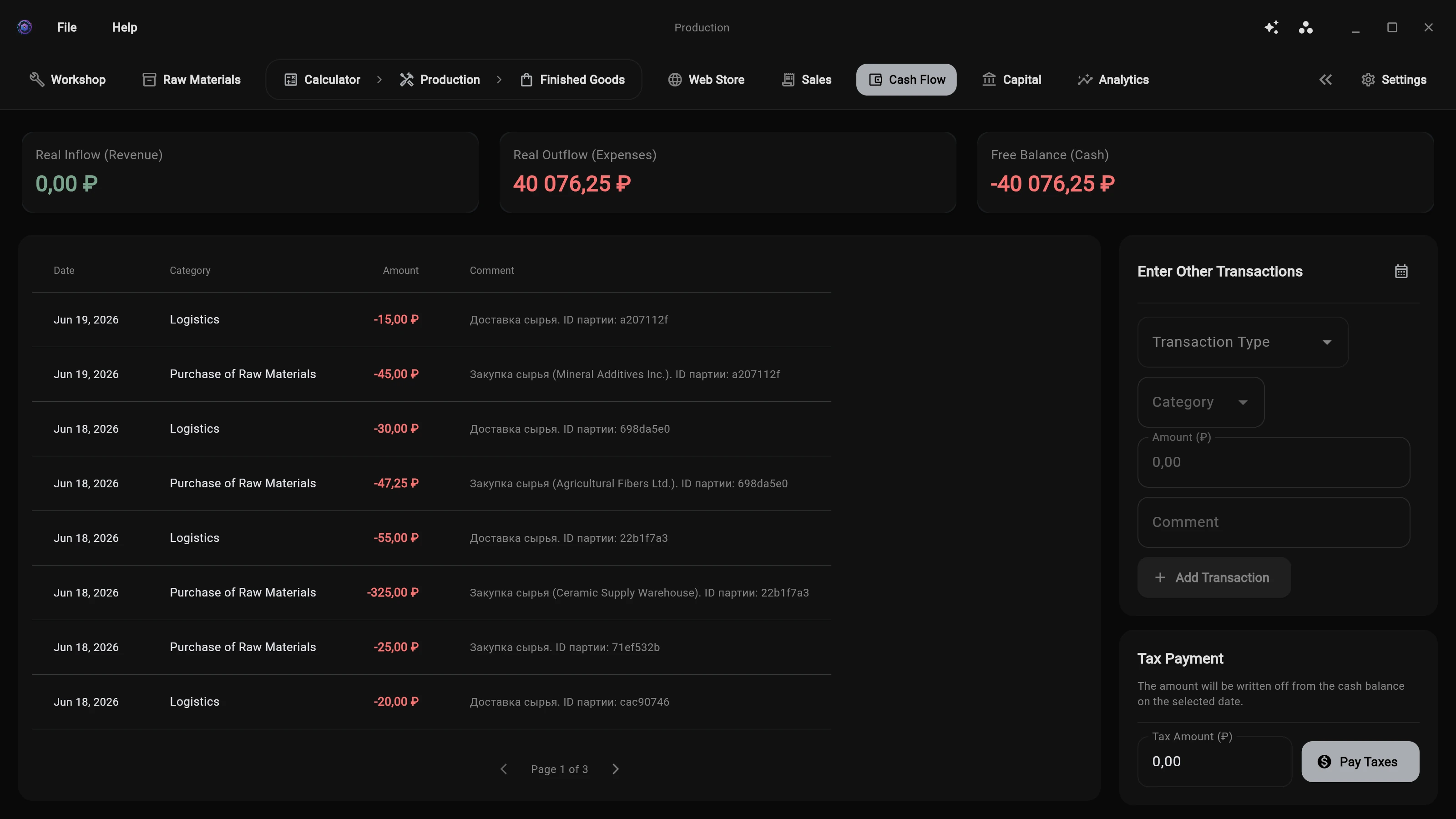
The "Cash Flow" (DDS) tab serves as the centralized cash register and treasury hub for your business. Whether you operate a manufacturing workshop, run a repair service center, sell goods on online marketplaces, or work as an independent artisan, this tool monitors physical liquidity across cash drawers and bank accounts.
Unlike the "Capital" balance sheet, which tracks the overall net worth of your enterprise (including machinery, tools, warehouse raw materials, and finished goods), the Cash Flow module operates on a strict cash basis. It logs each unit of currency exclusively when it physically enters or leaves your accounts, safeguarding you against cash shortages.
Cash Mechanics: Three Key Indicators
Three primary financial counters are situated in the upper dashboard, reflecting the real-time state of your cash position:
- Actual Inflow (Cash): The sum of all monetary funds that physically arrived into your business (retail sales revenue, advance deposits on service work orders, diagnostic fees, masterclass tuition).
- Actual Outflow (Expenses): All funds physically disbursed (procurement of materials and spare parts, shipping fees, facility rent, advertising, digital services, taxes).
- Net Balance (Saldo): The difference between cumulative inflows and outflows at the current second.
Mixed Finances Philosophy: Why a Negative Balance is Normal
In conventional corporate bookkeeping, a negative cash balance is considered a critical error. In the real world of small businesses, artisan workshops, and independent creators, the reality is different: at launch or during expansion, the founder pays for machinery, rent, and inventory out of personal savings or personal cards.
Requiring a founder to document formal shareholder loans for every routine purchase turns operations into bureaucratic chaos that quickly gets abandoned.
OmniCraft ERP implements the natural law of mixed finances:
A Negative Balance is an Honest Record of Founder Investment
A negative Cash Flow balance indicates that you invested personal capital into launching or expanding the business. The software truthfully logs this funding volume as a negative balance.
It provides a transparent answer to the question: "How much money does the business owe back to you right now?"
As soon as the cash balance crosses zero and enters positive territory, it signals that the enterprise has fully repaid the founder's initial capital and has begun generating net cash profit.
Practical Example: Journey from Founder Capital to Net Profit
To visualize how a negative Cash Flow balance transforms into real profit, consider a standard business lifecycle:
Initial Investment
You invested personal capital: purchased machinery and tools for $1,500, raw materials for $500, and launched ads for $100.
• Cash Flow Saldo: -$2,100 (volume of personal founder funding).
• Capital Balance: $2,000 (assets in machinery and raw materials).
Fulfillment and Recovery
You completed a run of orders: used raw materials worth $200, machine wear was $20, and clients paid $800.
• Cash Flow Saldo: -$2,100 + $800 = -$1,300 (cash is recovering investments).
• Capital Balance: $1,780 (tools $1,480 + raw materials $300).
Break-even and Net Profit
You converted the remaining inventory (worth $300) and sold goods for another $1,500.
• Cash Flow Saldo: -$1,300 + $1,500 = +$200 (all $2,100 recovered, cash turned positive).
• Capital Balance: $1,450 (machinery remains valuable and continues earning).
Cash Flow Specifics Across Industries
The nature of monetary flows varies depending on your operational profile:
In the Service Sector
In service workshops, electronics repair centers, and custom studios, deposits and job-specific parts play a central role:
- Order deposits: client prepayments received when taking in a repair are immediately logged in cash, protecting you against unpaid custom parts orders.
- Component expenses: parts ordered for a specific work order are logged in the cash register upon procurement.
- Final settlement: when handing over the completed repair, the remaining payment for labor and parts enters the ledger upon work completion sign-off.
In Manufacturing and Crafts
In artisan workshops or batch production facilities, cash supports the material production cycle:
- Bulk raw material lots: the cash ledger finances wholesale orders of sheet metal, leather, hardwood, or 3D resins.
- Logistics and freight: transport costs are recorded as a separate order, increasing the recorded unit cost of materials in the warehouse.
- Shop overhead: recurring monthly outlays (facility rent, industrial electricity, heating) are allocated to corresponding categories.
In Retail and Marketplace Sellers
In e-commerce and retail storefronts, cash is synchronized with marketplace payment schedules:
- Platform payouts: revenue does not arrive per individual receipt, but in scheduled batch transfers based on settlement reports minus platform commissions.
- Storage and fulfillment costs: warehousing and courier fees are entered as direct operating expenses.
- Customer refunds: customer returns trigger an expense entry linked to the original sales record.
For Independent Artisans
For solo makers, OmniCraft ERP eliminates the immediate need to open complex corporate bank accounts on day one. You simply maintain clear separation between personal funds and workshop cash within a single interface.
Cash Flow Sources: Automated vs Manual
The financial engine relieves you of double data entry. Most cash ledger entries are created autonomously:
| Transaction Source | Direction | How Entry is Generated |
|---|---|---|
| Warehouse (Batch Procurement) | Expense | The system automatically creates two orders: material purchase and freight delivery |
| Sales (Checkout Receipt) | Income | Revenue is immediately deposited into cash upon completing a sale |
| Work Orders (Service Sector) | Income | Deposit payments and final order closings increase the cash balance |
| Workshop (Asset Purchase) | Expense | If machinery is marked as paid from cash, an expense order is generated |
| Online Storefront | Income | Customer order confirmations add the transaction to the ledger |
Entering Miscellaneous (Manual) Transactions
All operational money movements not tied directly to standard finished goods sales are entered via the "Add Other Transaction" form on the right panel:
- Transaction Type:
- Expense (Disbursement): operational costs of the enterprise (rent, cloud services, marketing).
- Non-operating Income: supplemental receipts (hosting a training masterclass, consulting, renting out equipment, selling scrap materials or offcuts).
- Category Selection:
- For expenses: Advertising, Hosting & Services, Facility Rent, Logistics, Equipment Maintenance, or the universal Other category.
- For income: Masterclass, Custom Services, Other.
- Smart Amount Input: clicking the input field clears default zeroes automatically to accelerate form entry.
- Date Selection: transactions can be recorded under any past date using the integrated calendar.
Dedicated Section: Tax Payment
To avoid confusing tax obligations with routine operational expenses, a streamlined "Tax Payment" form is positioned at the bottom of the right panel:
- Specify the tax amount calculated for your current reporting period.
- Select the actual payment date.
- The system generates an expense record under the protected "Taxes" system category.
These payments are isolated in analytical reports, allowing you to clearly monitor operating profit before taxes and net earnings after fiscal disbursements.
Cash Register Log and Financial Discipline
The chronological ledger of all cash movements occupies the left half of the screen:
- Color Accents: receipts are emphasized in green with a "+" sign, disbursements in red with a "-" sign.
- Pagination: the log displays records in blocks of 20 rows, ensuring smooth interface responsiveness even with thousands of yearly entries.
- Backdated Entries: when entering past operations, the program sets the timestamp to neutral noon
12:00:00. This avoids timeline conflicts and preserves consistent daily opening and closing balances.
The Maker's Golden Rule: Never Confuse Revenue with Personal Income
A frequent cause of small business distress is the habit of withdrawing all cash revenue for personal spending immediately after a large sale.
Cash Inflow is Not Pure Personal Salary
Until raw materials for the next production cycle, facility rent, and fiscal obligations are accounted for, those funds belong to the enterprise.
Withdraw money for personal consumption strictly via a dedicated expense transaction noted as "Owner Profit Distribution" or "Founder Salary", maintaining a resilient working cash buffer in your business.