
Equipment & Assets
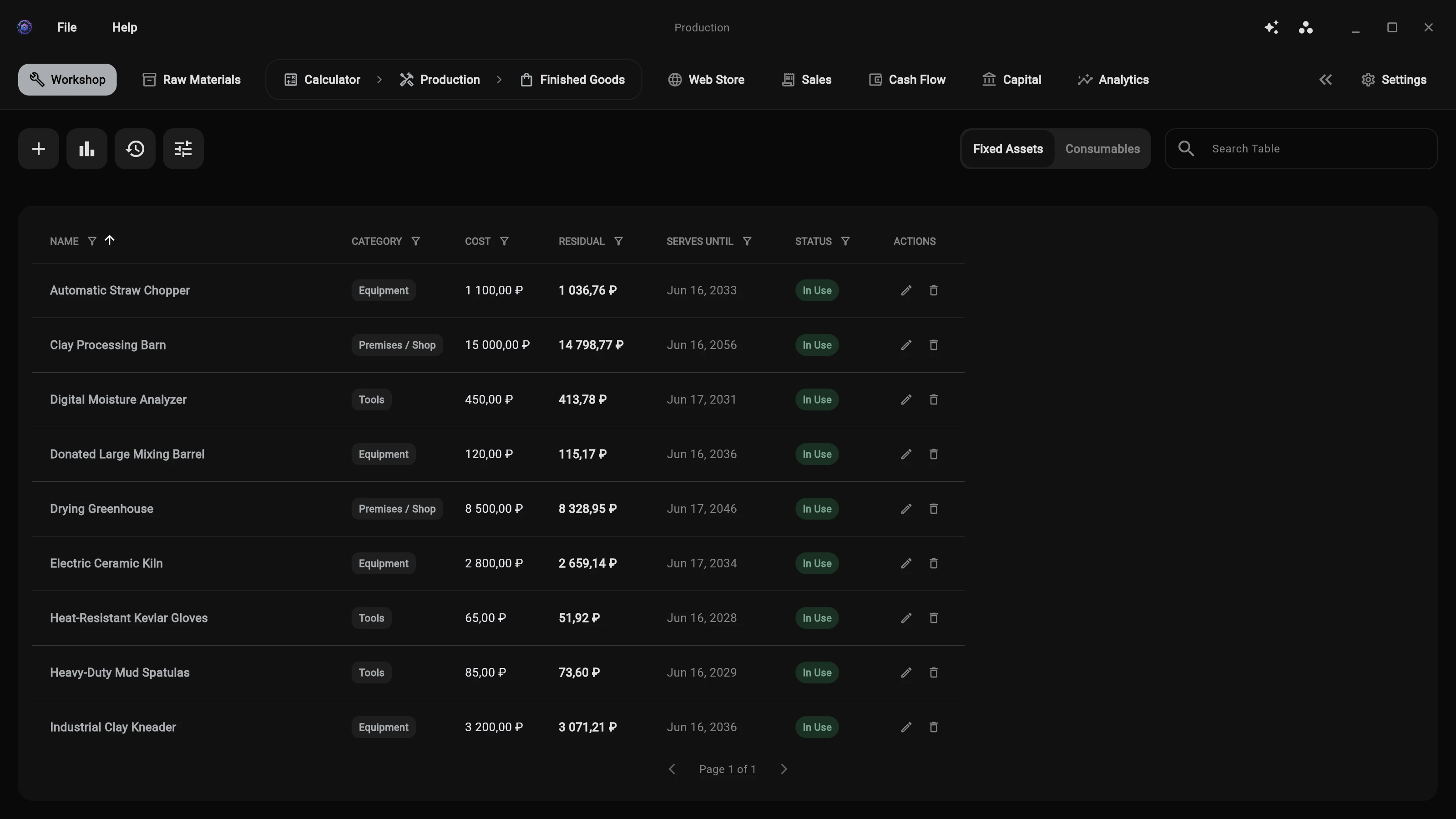
The "Workshop" tab serves as the single command center for managing long-term physical assets across your business. Whether you handcraft products, run a repair and service center, manage retail inventory, or sell goods on marketplaces, your physical equipment forms the bedrock of your business net worth.
This is far more than a simple inventory list of tools on a shelf. The module connects tangible items directly with managerial accounting: it reveals the true current value of your business, calculates monthly wear and tear automatically, and helps you factor depreciation into your prices.
Economic Principle: Transforming Cash into Capital Assets
In personal finance, purchasing expensive machinery is often viewed as spending money. In OmniCraft ERP's professional managerial accounting, acquiring production assets follows the law of capital preservation:
- Capital does not decrease upon purchase. Spending $1,000 on a laser engraver, soldering station, or thermal printer does not make your business poorer. You simply convert liquid cash into a working fixed asset. Your total business net worth in the "Capital" report remains completely unchanged.
- Lean depreciation without machine-hour overhead. Enterprise accounting systems often force operators to log tedious machine-hours for every minor tool. OmniCraft ERP uses a streamlined straight-line depreciation method:
- The system divides historical cost by useful lifespan and computes the exact monthly depreciation across your entire workshop.
- Knowing this figure alongside your average monthly output or service orders, you can factor equipment wear directly into your recipe overhead or labor rates. Equipment pays for itself predictably with every completed order.
Straight-line depreciation made simple
If an engraver is purchased for $1,200 with a 5-year useful life (60 months), the system reduces its book value by $20 each month. Your Capital balance always reflects honest, market-grounded value based on machine age rather than an inflated historical number.
Two Tracking Modes: Property vs Consumables
At the top of the workspace table, an intuitive switch lets you toggle between two fundamentally distinct types of physical assets:
| Property (Fixed Assets) | Consumables (Workshop Tooling) |
|---|---|
| Category: Long-term capital equipment (machines, workbenches, vehicles). | Category: Fast-wearing auxiliary tooling (drill bits, cutters, abrasive discs). |
| Useful Lifespan: 1 to 20+ years (configured in item card). | Useful Lifespan: None assigned (consumed in day-to-day operations). |
| Balance Impact: Monthly linear depreciation into Net Worth. | Balance Impact: Direct operational cash outflow in Cash Flow (DDS). |
1. Long-term Property (Fixed Assets)
Core equipment designed for years of productive life (machinery, workbenches, testing instruments, computers, commercial furniture, utility vehicles).
- Each item requires a designated useful lifespan in years or months.
- The system deducts straight-line depreciation on a monthly cadence, gradually adjusting book value.
- Remaining residual value feeds directly into the tangible asset block of your business Capital summary.
2. Consumables & Fast-wearing Tooling
Auxiliary tooling and attachments with short lifecycles (drill bits, CNC endmills, soldering tips, blades, brushes, specialty lubricants).
- Consumables do not carry a useful lifespan and do not accumulate depreciation.
- Their acquisition cost posts immediately as an operating expense in the Cash Flow register (DDS) upon purchase.
- You can replenish stock quantities anytime via the "Replenish" button without bloating your fixed asset ledger.
Industry-Specific Workflows
The mechanics of logging and tracking assets are universal, but your daily operational focus depends on your business model:
Service Centers & Repair Studios
In a repair shop, service center, or customer studio, assets equip master technician workstations:
- What to track under Property: diagnostic scanners, soldering stations, air compressors, vehicle lifts, sterilizers, professional salon stations, client waiting area furniture, and front-desk computers.
- What to track under Consumables: protective covers, disposable nozzles, solder wire, soldering iron tips, cleaning cloths, and contact cleaners.
- Depreciation recovery: divide total monthly equipment depreciation by your average monthly ticket count, factoring this cost directly into base hourly labor rates or fixed service premiums.
Manufacturing & Craft Workshops
In artisanal and batch production shops, assets directly transform raw materials into finished merchandise:
- What to track under Property: cutting tables, CNC laser engravers, industrial sewing machines, clicker presses, pottery kilns, and drying cabinets.
- What to track under Consumables: replacement rotary blades, heavy-duty needles, sanding disks, cutting mats, and polishing compounds.
- Depreciation recovery: in the "Calculator" module, include a machine wear allowance in product recipes so that every item sold reserves funds for future machinery replacement.
Retailers & E-commerce Marketplace Sellers
In retail and fulfillment operations, assets streamline order packing, labeling, and stock movement:
- What to track under Property: commercial barcode label printers, handheld laser scanners, impulse bag sealers, display shelving, pallet jacks, and digital parcel scales.
- What to track under Consumables: packing tape, bubble wrap rolls, poly mailers, and thermal shipping ribbons.
- Depreciation recovery: warehouse equipment depreciation is factored into order fulfillment and logistics overhead per dispatched parcel.
Asset Lifecycle: 5 Common Real-World Scenarios
Clicking "Add Asset" opens the configuration dialog. Here is how to handle everyday asset operations without ledger confusion:
Scenario 1: Initial Setup When Migrating to OmniCraft
You do not need to hunt down receipts from years ago. Estimate the machine's current fair market value by comparing used listings online, and assign its remaining expected lifespan (e.g., 3 years). The software calculates depreciation smoothly from that realistic baseline without distorting historical cash flow.
Scenario 2: Personal Assets Transferred In or Equipment Grants
When you transfer personal tools into the business or receive subsidized government grant equipment:
- Enter the item's estimated value in the asset card.
- Leave the cash account payment field empty (no deduction from Cash Flow).
- The item appears on the balance sheet, increasing business net worth without recording a false cash deficit.
Scenario 3: Asset Revaluation Due to Market Changes
If imported machinery appreciates significantly due to currency fluctuations or replacement cost increases, select "Revaluate" from the row action menu:
- Enter the updated current market value.
- OmniCraft recalculates residual book value and monthly depreciation going forward.
- Liquid cash accounts remain untouched—only balance sheet valuation adjusts.
Scenario 4: Routine Maintenance vs Capital Upgrades
Always distinguish between operating maintenance and capital improvements:
- Routine repairs and tune-ups (oil change, blade sharpening, drive belt replacement): record as a normal operating expense in Cash Flow under "Equipment Maintenance". The machine's book value remains unchanged.
- Capital upgrades (adding a CNC controller, retrofitting a servo motor): post the payment in Cash Flow, then edit the asset card to increase historical value by the upgrade amount and extend its lifespan.
Scenario 5: Write-off or Asset Sale
- Catastrophic failure beyond repair: choose "Write Off". The asset moves to the archived log, and its residual value is removed from business Capital.
- Equipment sale: record incoming funds in Cash Flow as asset liquidation revenue and archive the asset card.
Navigation, Filters & Registry Order
When your tool inventory grows past dozens of items, leverage the top toolbar controls to maintain operational clarity:
| Control | Function | Practical Benefit |
|---|---|---|
| Search by Name | Instant substring matching | Quickly locate tools by brand name, serial code, or model |
| Categories | Group assets by functional type | Segment machines, hand tools, electronics, and furnishings |
| Locations | Filter by physical workspace | Track equipment across the main floor, warehouse, or mobile vans |
| Column Sorting | Sort by cost, date, or residual value | Identify high-value investments or machines nearing end of lifespan |
| Reset Filters | One-click filter clear | Instantly restore full view of all active company assets |
Custom Categories & Storage Locations
You are never locked into predefined presets. Click the dictionary settings icon next to category or location dropdowns to define custom zones ("Laser Bay", "Assembly Bench", "Packaging Desk") tailored to your exact facility floor plan.